
Turn Your LinkedIn Export Into Resume Bullets With AI
Your LinkedIn already has the job written up in more detail than your resume has room for. Added in pieces, over years, close to when it happened.
The problem isn’t the record. It’s getting it out without an AI inventing the parts you skipped.
The advice going around is to paste your LinkedIn URL into ChatGPT and ask it to build a resume. I tried that the way most people would, dropping a public profile link into a chat window, and it came back empty. LinkedIn has no public API for content retrieval and blocks automated scraping outright.
Its User Agreement prohibits “scraping, crawling, or using spiders or other bots” without written permission. A general-purpose chatbot handed a bare profile link either returns nothing or hits a login wall.
The tools that advertise “just paste your LinkedIn URL” work because they’ve built their own scraper behind the scenes. Paste that same link into ChatGPT or Claude and there’s no scraper waiting on the other end.
Two things do work. One of them takes thirty seconds.
Screenshot it first
Scroll to your Experience section and take a screenshot, or a few if your history runs long. Drop them straight into ChatGPT or Claude. Both read text off an image now, and that’s the whole trick: you’re showing it a picture you already have instead of asking it to fetch anything from LinkedIn. It’s done before an export would even land in your inbox.
Skip the screenshots if you want the whole profile in one shot. Click “More” below your name, then “Save to PDF” from the dropdown.
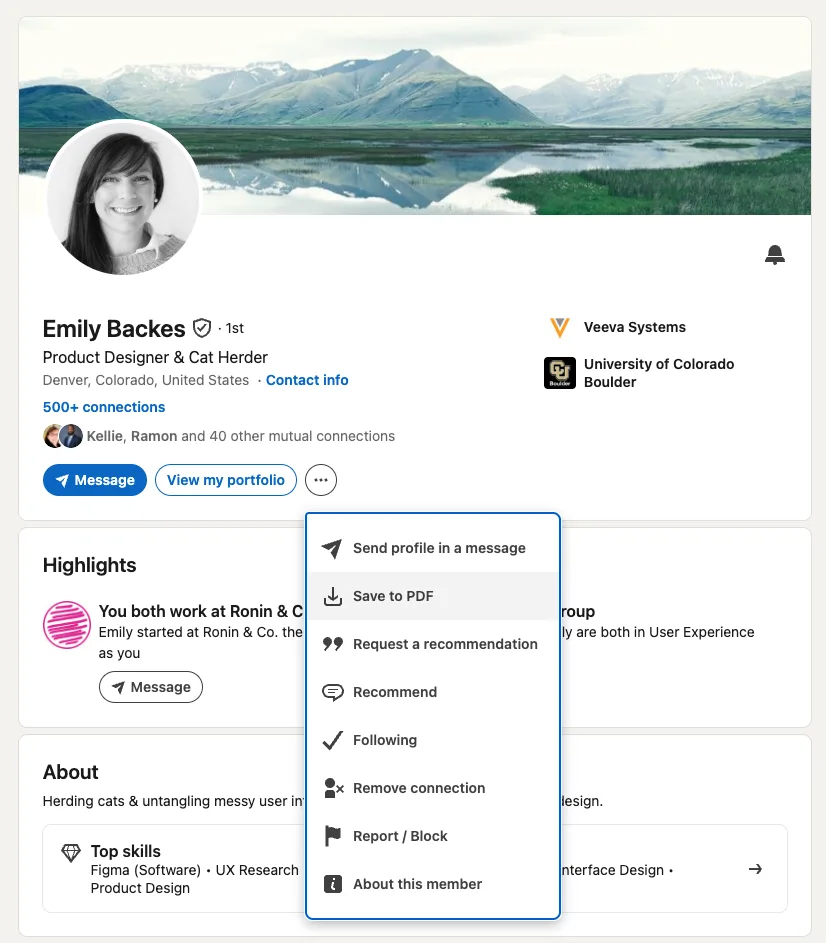
That’s your entire profile as one text-based PDF, exact text instead of a picture of it, ready in seconds. Attach it instead of a screenshot and use the same prompt below.
It’s in the order you need, too. LinkedIn renders your Experience section current role first, because that’s just how the page is built.
You didn’t do that work. LinkedIn did, one job at a time, as you lived it.
Attached is my LinkedIn work history, oldest habits and all, already in reverse-chronological order. Turn each entry into one or two resume bullets, in the same order. Use only what’s shown. Don’t add tools, numbers, or outcomes I didn’t mention.
You’ll get a full, ordered draft of your experience section faster than you’d write the first job from scratch, because you’re not starting from nothing. You’re editing something you already said once. If a bullet still reads flat once you have it, the XYZ formula fixes that faster than another AI pass will.
When the export is worth the wait
A screenshot is the fast path, but it asks a vision model to read small print correctly: an exact date, an unusual title, a company name with odd capitalization. Most of the time it gets this right. If your history runs past what fits in a handful of screenshots, or you’d rather hand over exact text than trust a read, request the export instead.
Settings & Privacy, then Data Privacy, then “Get a copy of your data.” Take the quick tier, ready in about ten minutes, not the full archive, which also bundles your messages and search history and takes 24 to 48 hours to arrive.
You want Positions.csv and Profile.csv, nothing else. There’s no reason to hand a third-party AI tool more of your account than a resume needs, and the ten-minute version already has it.
Check it against the source before you trust it
Career coach Jen DeLorenzo, who runs The Career Raven, has watched what happens when people push AI to match a resume to a job posting: “it is going to start to lie if the title doesn’t 100% align.” Even careful prompting, she says, still gets things wrong, sometimes basic things, like the name of the company. The failure mode is a model trying to be helpful, closing a gap you didn’t ask it to close.
The fix is cheap, so use it every time, screenshot or export. Ask the AI to check its own draft against what you fed it.
Compare the bullets you just wrote against my original LinkedIn text above, line by line. List anything you added that wasn’t in my original text, including job titles, dates, tools, or numbers.
Read the list it gives you. Fix or delete anything on it before this goes anywhere near a job application.
Once your experience section is real and in order, that’s the point to tailor it honestly to a specific posting. Drop the finished bullets into a template built to survive ATS parsing and run the result through my free ATS resume checker before you send it anywhere.
Reflective Coda
None of this works if you’ve never touched your LinkedIn since you set it up. Your profile only has what you put there. But most people update it in small pieces, a new role here, a certification there, without ever sitting down to write the whole career story at once.
That scattered record turns out to be the most honest first draft you have. You wrote it in real time, one small update after another, long before you needed a resume out of it.
Sources
- Download your account data (LinkedIn Help)
- Reorder your current positions in the Experience section (LinkedIn Help)
- Don’t Make These AI Mistakes on Your Resume, Career Experts Say: “It Could Ruin Your Chances” (CNBC, 2025, citing career coach Jen DeLorenzo of The Career Raven)
- When LinkedIn Blocked My Chatbot (Jay Ozer)
- Emily Backes, “How to Tailor Your Resume Using AI (Without Looking Fake)”, 2026.
- Emily Backes, “How to Structure a Resume: A Beginner’s Guide to Formatting, Bullets, and ATS”, 2026.
- Emily Backes, “11 ATS-Friendly Resume Templates [Free Downloads for 2026]”, 2026.