
11 ATS-Friendly Resume Templates [Free Downloads for 2026]
A resume doesn’t get rejected because it looks bad. It gets rejected because a parser can’t read it, and those are two different problems with two different fixes.
I spent eight years as a recruiter, reading and rejecting candidates, sometimes based on their resumes, and I design for a living now, so I’ve already written about why resume structure matters this much. Instead of another post about the theory, I built 11 free resume templates, each one ATS-tested. One template for each real situation, from entry-level to federal to a career pivot.
Every template opens as a plain document with a real text layer, no embedded images or text boxes standing in for words. Grab whichever one matches your situation, fill in the brackets, then run it through my free ATS resume checker before you send it anywhere.
Pick your template
Entry-Level
Built for a thin work history: education leads with GPA and coursework, and a dedicated Projects section carries weight your job history can’t yet.
Career Change
Leads with a Transferable Skills block grouped by skill area, not job title, so the overlap lands before a title mismatch does.
Executive
Every bullet built around a number: revenue, team size, budget owned. The only template here with a Board Memberships & Affiliations section.
Academic CV
Doesn’t look like a resume, and shouldn’t. Research Interests, Publications, and Grants & Awards replace the work-experience block entirely.
Federal
Asks for GS series, supervisor contact, salary, and hours per week, exactly what USAJobs and agency systems expect and nothing else does.
Technical
Skills split into Languages, Frameworks & Platforms, and Tools, plus a header GitHub link and a dedicated Projects section.
Minimalist
No styling flourishes, exactly four sections: Summary, Experience, Skills, Education. The safest choice if you’d rather not think about formatting risk.
Hybrid
A keyword-dense skills bar over standard reverse-chronological experience, the shape most recruiters expect by default.
Functional
Groups accomplishments by skill heading instead of employer, for a genuine gap or scattered timeline. Some recruiters read it as something being hidden, so use it deliberately.
AI-Ready
Every bullet is written as an instruction, built to be fed straight into ChatGPT or Claude alongside your real accomplishments.
Two-Column
A real two-column layout for design-forward roles a human opens directly. Parses less reliably. Keep a single-column backup for anything routed through software first.
The two-column layout is the one exception on this list, and I debated leaving it out entirely. It’s here because some design-forward roles reward a resume that looks considered, and a human is often the first reader in those pipelines. But I’ve cited the Jobscan test before where a design-heavy, similarly laid-out resume only parsed correctly in one section once it hit an actual Lever ATS. See what else in a resume’s formatting trips up an ATS parser beyond just the column count.
Fill them in with AI
These templates ship with an AI friendly structured format. AI is fast at turning your real experience into the specific line each bracket wants, as long as you feed it facts instead of asking it to invent them.
If your whole work history already lives on LinkedIn, don’t retype it from scratch. Scroll to your Experience section, take a screenshot, and drop it straight into ChatGPT or Claude. Both read text off an image now, so you get a full draft of every bullet, in order, in one pass instead of filling in one bracket at a time.
Your profile menu has a faster way to grab the whole thing at once. Click the “More” button below your name, and “Save to PDF” is sitting right there in the dropdown.
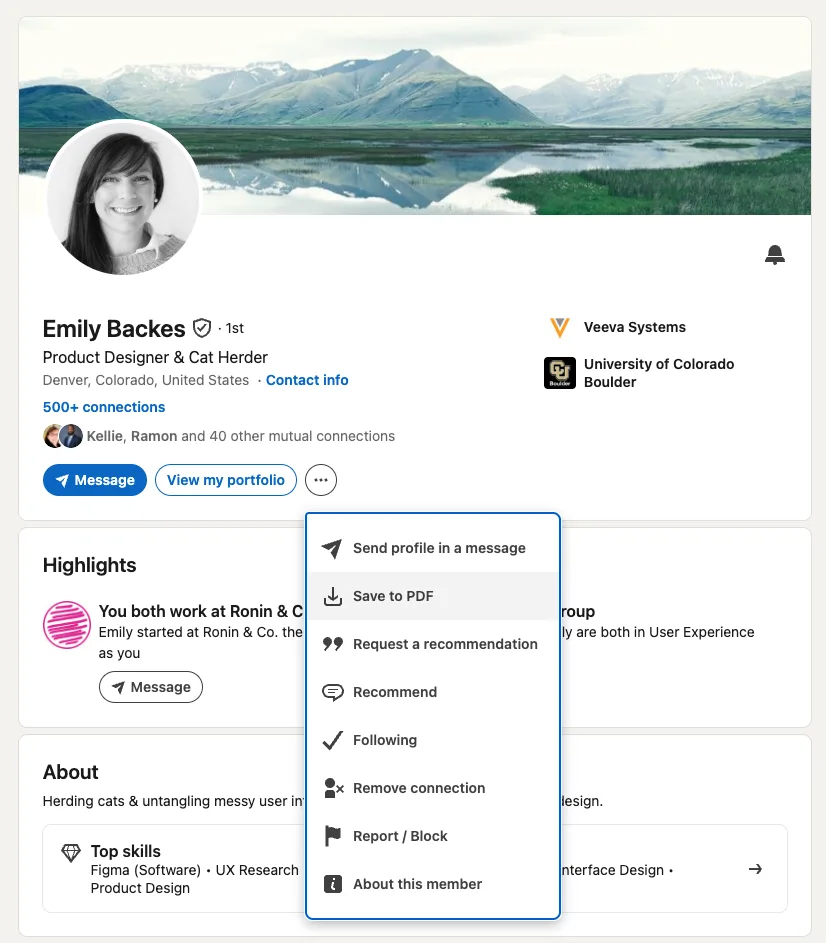
That gives you your entire profile as one text-based PDF, so there’s no small print for the AI to misread and no scrolling to catch every job. Attach the PDF instead of an image and use the same prompt. The full method, plus when a LinkedIn data export beats either one, is its own post. Here are a few starter prompts to enrich the details of your resume through LLMs.
Attached is my LinkedIn work history, already in reverse-chronological order. Turn each entry into one or two resume bullets, in the same order. Use only what’s shown. Don’t add tools, numbers, or outcomes I didn’t mention.
Once you’ve got a full draft, or you’re filling one bracket in at a time, these three keep the details honest.
Turn this into a resume bullet: I [did the task] using [tool or method], which led to [result]. Keep it under 20 words. Don’t add any detail I didn’t give you.
Here’s my resume and a job posting. Point out where my experience already overlaps with what they’re asking for. Don’t rewrite my bullets or invent anything new.
Read this resume text back to me exactly as you parsed it, section by section. Flag anything garbled, out of order, or missing.
Feed it your own numbers and your own words. The second an answer includes a detail you never gave it, that’s invention, not tailoring. Here’s where that line sits in more detail.
Reflective Coda
Matching the shape of the document to what’s actually going to read it first: a piece of parsing software with narrow expectations. Save the personality, the risk-taking, the actual craft for the parts of the process where a human is guaranteed to see it: your portfolio, your cover letter (only if required), the conversation once you’re in the room.
Pick the template that matches your situation honestly. An executive template on an entry-level resume reads as strange in the other direction too.